Customer integrations
A single Web Chat channel can serve your website, a WordPress site, a Help Center page inside your customer app, and the optional React Native customer SDK. All of them create conversations in the channel’s workspace and default workgroup, and staff answer them in the same inbox.
Examples use https://support.example.com for your KasaDESK installation, https://www.example.com for your website and pk_EXAMPLE_PUBLIC_SITE_KEY for the site key.
What operators configure firstLink to this section
- Create a Web Chat channel for the brand. See Web Chat.
- Add each exact embedding origin to the channel’s allowed origins. Include a non-default port when there is one, for example
https://help.example.com:8443. Local files and inline HTML have no usable HTTPS origin and cannot load the chat. - Copy the publishable site key (
pk_…). - If customers are signed in on your site or app, keep the channel’s identity secret on your backend only.
- For a native app without a web page, set Native app access.
- Publish the brand’s chat colours. See Per-brand widget appearance.
| Value | Public or private | Where it goes |
|---|---|---|
| Installation origin | Public | Script src, SDK baseUrl, WordPress server URL |
Site key pk_… |
Public | Page HTML, app bundle, WordPress settings |
| Identity secret | Private | Your backend or wp-config.php only. Never in HTML, JavaScript or an app binary. |
| Customer records API key | Private | KasaDESK Admin and your records service only |
Embed chat on a websiteLink to this section
Add the loader before </body> on every page that should offer chat:
<script async src="https://support.example.com/widget/loader.js"
        data-site-key="pk_EXAMPLE_PUBLIC_SITE_KEY"></script>
The loader adds a floating Chat with us launcher and an isolated chat frame served by your installation. The customer’s messages and session live inside that frame, not in your page. On small screens the chat opens full screen and adapts to the on-screen keyboard. Escape or Close chat closes it and returns focus to the launcher.
JavaScript APILink to this section
After the loader runs, window.KasaDesk provides:
| Call | Purpose |
|---|---|
KasaDesk.open(trigger?) |
Open chat. In manual-launcher mode, pass your trigger to return focus to it on close. Standard mode returns focus to the built-in launcher. |
KasaDesk.close() |
Close the chat. |
KasaDesk.identify(token) |
Pass a short-lived identity token signed by your backend. See Verified identity. |
KasaDesk.on('ready', fn) |
Called when the chat is ready, with { primary, primaryContent } published colours. |
KasaDesk.on('open', fn) and KasaDesk.on('close', fn) |
Called when the chat opens or closes. |
With async, window.KasaDesk exists only after the script has run. If you call identify on page load, load the script without async, or wait for it.
Use your own buttonLink to this section
Add data-launcher="manual" to hide the floating launcher and open chat from your own control:
<button id="support-chat" type="button" aria-label="Chat with support">Chat with support</button>
<script src="https://support.example.com/widget/loader.js"
        data-site-key="pk_EXAMPLE_PUBLIC_SITE_KEY" data-launcher="manual"></script>
<script>
  const supportButton = document.getElementById('support-chat');
  supportButton.addEventListener('click', () => window.KasaDesk.open(supportButton));
</script>
Content Security PolicyLink to this section
If your page sends a CSP, allow the installation origin for scripts, frames and fonts, and allow the loader’s injected stylesheet. When you use nonces, put your nonce on the loader script tag. The loader applies it to the style it injects. Apply the nonce to your own inline scripts too.
WordPressLink to this section
The KasaDESK Chat plugin, included with the release, adds the loader to your WordPress site and can identify logged-in users.
- Copy the
kasadesk-chatfolder intowp-content/plugins/, or upload a zip containing only that folder under Plugins → Add New → Upload. Activate KasaDESK Chat. The widget stays off until configured. - In KasaDESK, open the site’s Web Chat channel. Add the WordPress origin shown on the plugin settings page to the allowed origins and copy the site key.
- In WordPress, open Settings → KasaDESK:
| Field | Value |
|---|---|
| KasaDESK server URL | Your installation origin, for example https://support.example.com. Origin only. |
| Site key | The pk_… key. |
| Show the chat widget | On, to show chat on the public site. |
| Identify logged-in users | On, to send signed identities for logged-in users. Guests always get anonymous chat. |
| Identity secret | The channel’s identity secret. Never printed back. Alternatively define KASADESK_IDENTITY_SECRET in wp-config.php to keep it out of the database. |
| Customer ID prefix | Default wp:<domain>. KasaDESK sees <prefix>:<user ID>. Keep it stable, or returning users will look new. |
Requirements: WordPress 5.8 or later and PHP 7.4 or later.
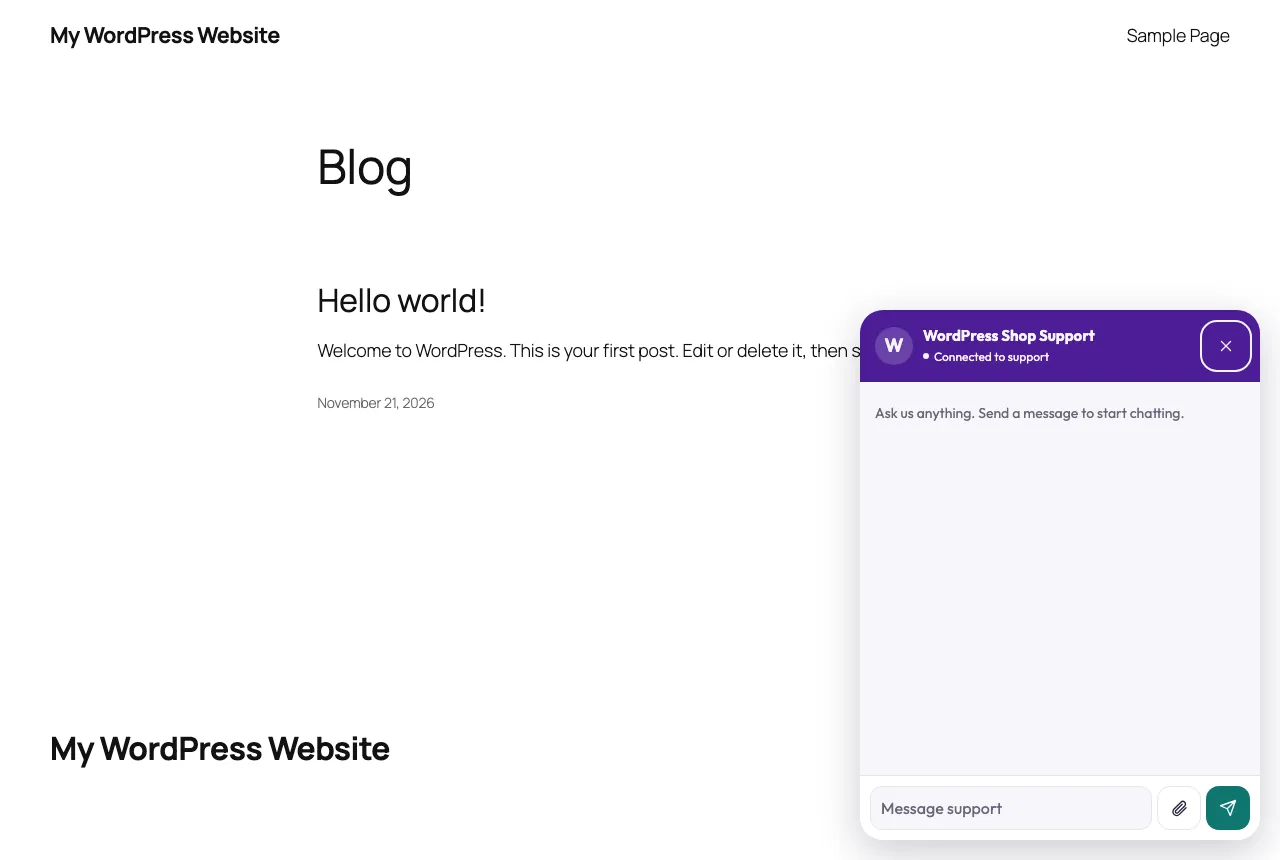
Notes:
- The identity token is fetched after page load from the plugin’s REST endpoint, never embedded in cached HTML.
- The chat session lives in the browser tab. A user who logs out of WordPress keeps their verified chat until that tab closes.
- To show WooCommerce order status to agents, see Customer records for verified customers.
The plugin is GPL-2.0-or-later. It has been exercised in WordPress Playground on PHP 7.4 and 8.3. Test it on your own web server, PHP and database stack, and behind any page cache or CDN you use.
Verified identity and ticket continuityLink to this section
Visitors start as guests. A visitor who types a name or email is unverified. Typed details never link to other records or unlock private data.
To mark a signed-in customer as verified, your backend signs a short-lived token with the channel’s identity secret:
- Payload:
sub(your stable customer ID, 1–200 characters), optionalname(up to 120 characters) andemail,aud(the channel’s site key), andexp(Unix seconds, no more than one hour ahead). - Token:
base64url(JSON payload)+.+base64url(HMAC-SHA256(identity secret, first part)).
Node.js example for your backend:
import crypto from 'node:crypto';

export function signKasaDeskIdentity(identitySecret, siteKey, customer) {
  const payload = {
    sub: customer.id,            // stable, never an email the user can change
    name: customer.name,         // optional
    email: customer.email,       // optional, must be a valid address
    aud: siteKey,
    exp: Math.floor(Date.now() / 1000) + 600,
  };
  const body = Buffer.from(JSON.stringify(payload)).toString('base64url');
  const signature = crypto.createHmac('sha256', identitySecret).update(body).digest('base64url');
  return `${body}.${signature}`;
}
Serve the token only to the authenticated customer, from an endpoint that is not cached, and pass it to window.KasaDesk.identify(token) or the SDK’s getIdentityToken. Never sign in the browser. An invalid claim, a wrong site key or an expired token rejects the whole token.
How conversations continue:
- A verified customer resumes their latest unresolved conversation on the same Web Chat channel, from any surface that uses that channel: website, WordPress, a hosted Help Center or the SDK.
- A guest session lasts for that browser tab, or for the app’s stored session with the SDK. A new browser or device starts a new guest conversation.
- A resolved conversation is not resumed. A new message starts a new ticket, or reopens the ticket if sent in the same session.
- Another Web Chat channel, or another brand, is a separate scope with its own conversations and customer records. Tokens for one channel’s site key are rejected by another.
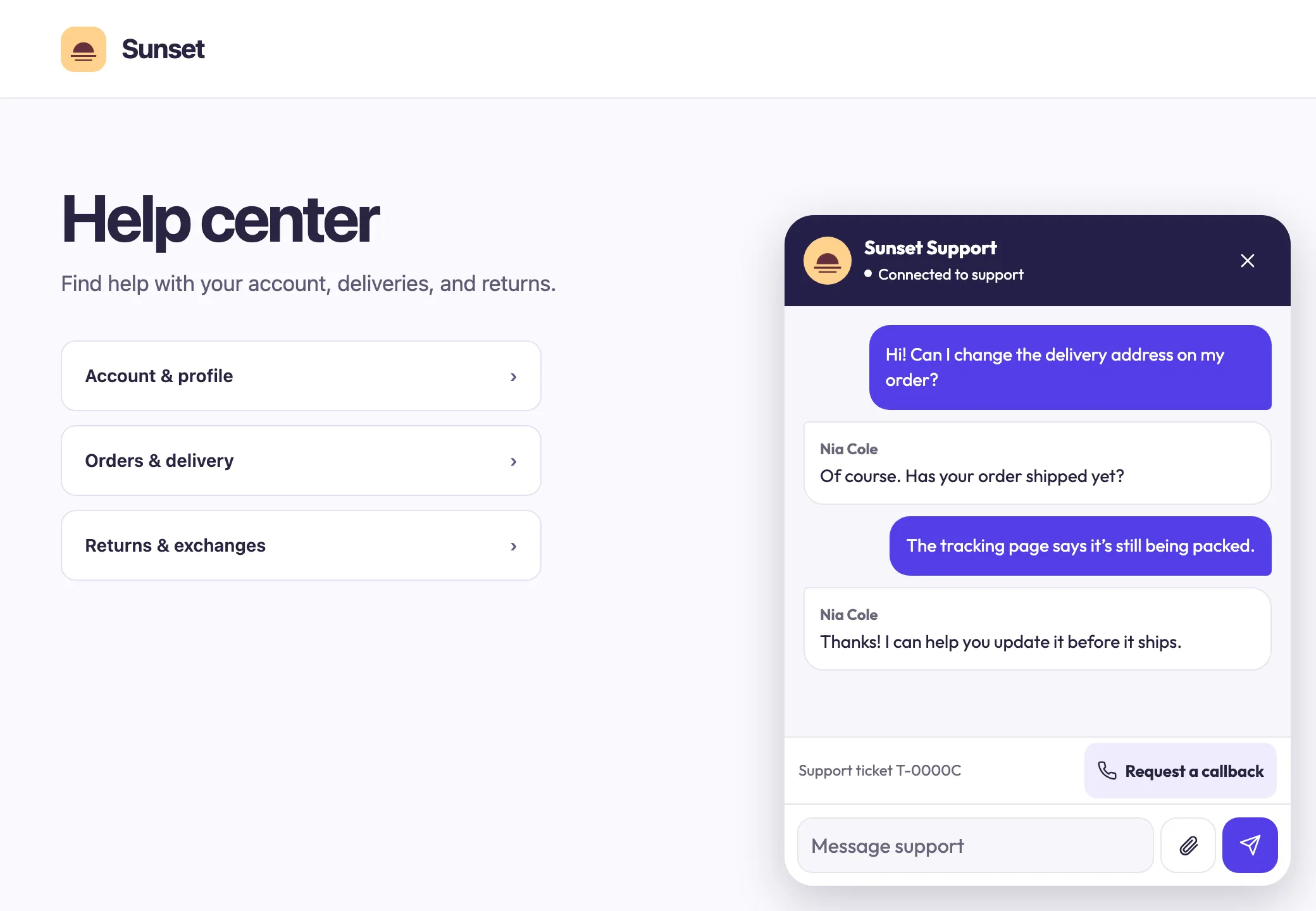
Once a conversation has a reply, the chat shows its reference, for example Support ticket T-0000C.
Per-brand widget appearanceLink to this section
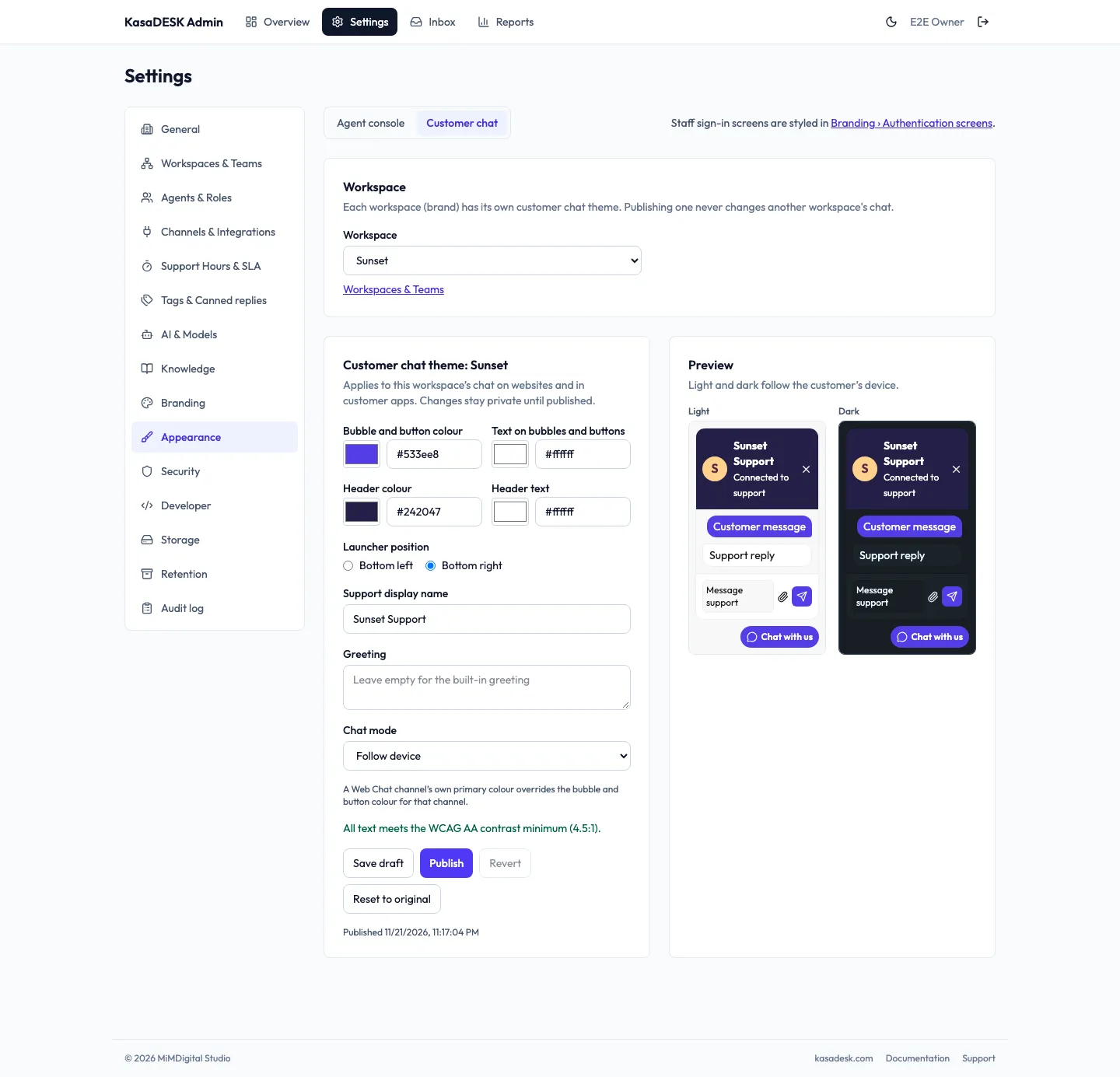
- Open Admin → Settings → Workspaces & Teams and choose Widget appearance for the brand. This opens Appearance → Customer chat with that workspace selected.
- Set Bubble and button colour, Text on bubbles and buttons, Header colour, Header text, Launcher position, Support display name, Greeting and Chat mode (follow device, light or dark). The page confirms when all text meets the WCAG AA contrast minimum (4.5:1). If a pair falls short, choose one of the suggested fixes under Some text would be hard to read, or pick other colours. Saving and publishing stay disabled until every pair passes.
- Save draft keeps changes private. Publish applies them. Revert returns to the previous published theme and Reset to original restores the defaults.
Publishing affects only that brand. New page loads on websites, WordPress and hosted Help Center pages use the published palette. The SDK refreshes it when its screen mounts or the app returns to the foreground. A Web Chat channel’s own primary colour and title override the brand theme for that channel. The brand’s Inbox badge colour is separate and never changes the customer chat.
External channel buttonsLink to this section
When the brand has healthy, assigned WhatsApp or Telegram channels, the chat offers Continue on WhatsApp and Continue on Telegram. They link to https://wa.me/… and https://t.me/… with only the destination and any brand routing code, and open in a new window. No chat content is transferred. The customer continues on that provider in a separate conversation. See Channel buttons in the web chat.
Callback requestsLink to this section
When Allow callback requests in web chat is enabled for the brand in Workspaces & Teams:
- After the ticket exists, the customer sees Request a callback.
- The customer enters a phone number with its international country code, for example
+1 202 555 0142, and chooses Send request. Numbers without a country code are refused with a message. - The chat shows Call requested and the customer can keep chatting.
- The authorized ticket timeline shows Customer requested a call at +…. Staff arrange the call.
One request is accepted per ticket. A resolved ticket must be reopened with a message first. KasaDESK records the request; it does not place the call.
Asking for a personLink to this section
When Autopilot is answering, the chat shows Talk to support. It pauses AI replies for that conversation and queues it for staff. See Customers asking for a person.
Support inside your customer appLink to this section
Your customer app owns its menu, its Help Center or Support screen and its Back navigation. Chat opens from that screen and closing it returns the customer there. This is your app for your customers. It is separate from the KasaDESK staff app that your support team uses to answer conversations, and customers never sign in with staff accounts.
Choose one of two approaches.
Option A: hosted Help Center page in a WebViewLink to this section
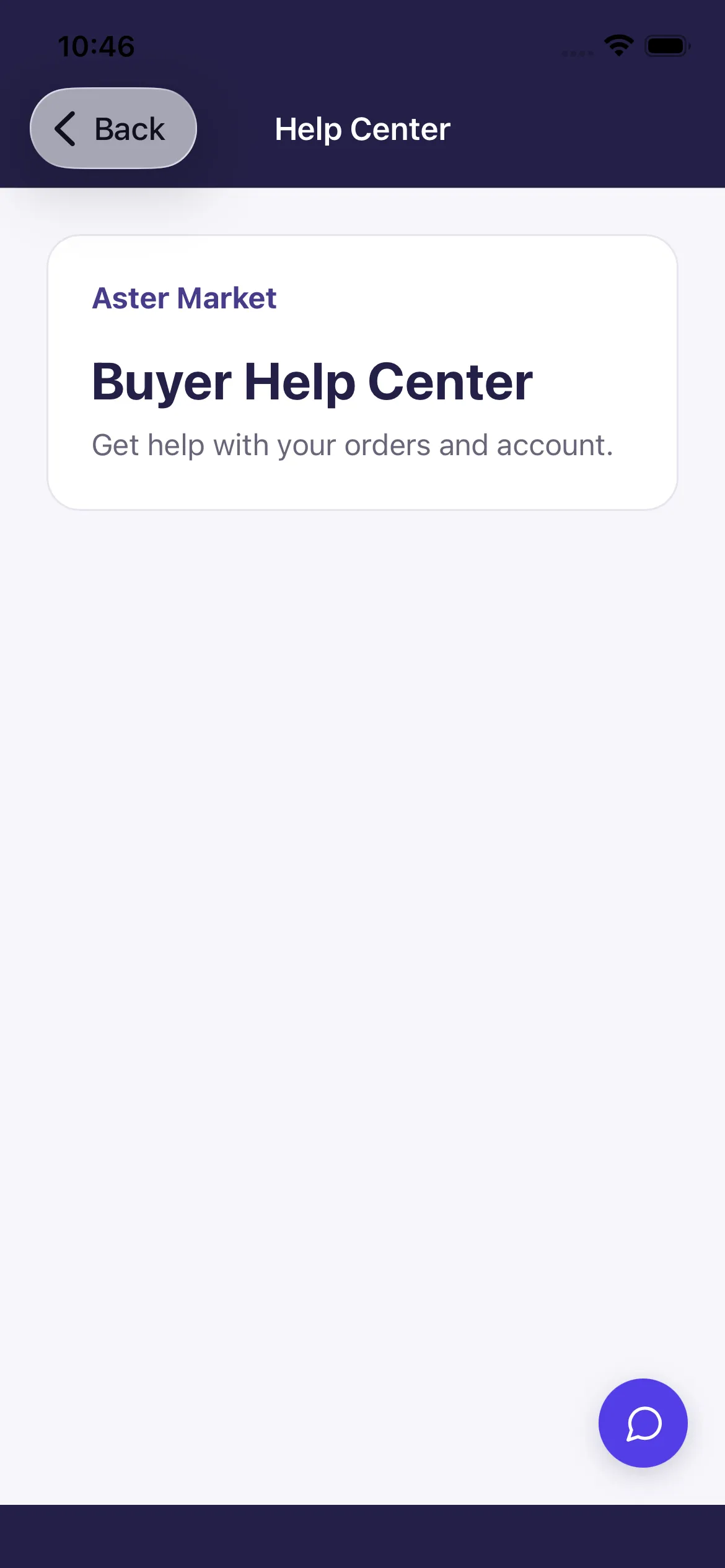
- Host a Support page on an HTTPS origin you control, for example
https://help.example.com/support. - Add that exact origin, including any non-default port, to the channel’s allowed origins.
- Use the loader with
data-launcher="manual"and a small round button labeled Chat with support:
<style>
  .support-chat {
    display: inline-grid; place-items: center;
    width: 44px; height: 44px; border: 0; border-radius: 50%;
    background: #3e2cd0; color: #fff;
  }
</style>
<button id="support-chat" class="support-chat" type="button" aria-label="Chat with support">
  <svg aria-hidden="true" width="22" height="22" viewBox="0 0 24 24" fill="none" stroke="currentColor">
    <path d="M21 11.5a8.5 8.5 0 0 1-12.4 7.6L3 21l1.9-5.6A8.5 8.5 0 1 1 21 11.5Z"/>
  </svg>
</button>
<script src="https://support.example.com/widget/loader.js"
        data-site-key="pk_EXAMPLE_PUBLIC_SITE_KEY" data-launcher="manual"></script>
<script>
  const supportButton = document.getElementById('support-chat');
  supportButton.addEventListener('click', () => window.KasaDesk.open(supportButton));
  window.KasaDesk.on('ready', ({ primary, primaryContent }) => {
    if (primary && primaryContent) {
      supportButton.style.backgroundColor = primary;
      supportButton.style.color = primaryContent;
    }
  });
</script>- Load the page in a WebView with JavaScript enabled. Keep your native Back control visible.
- For a route that opens chat on arrival, register a handler for the loader’s
readyevent and open chat there. If closing chat should leave the route, listen forcloseand call your app’s navigation through your WebView’s host bridge. - Handle file selection and downloads in the host app if you offer them.
- For signed-in customers, obtain an identity token from your backend and pass it to
window.KasaDesk.identify(token).
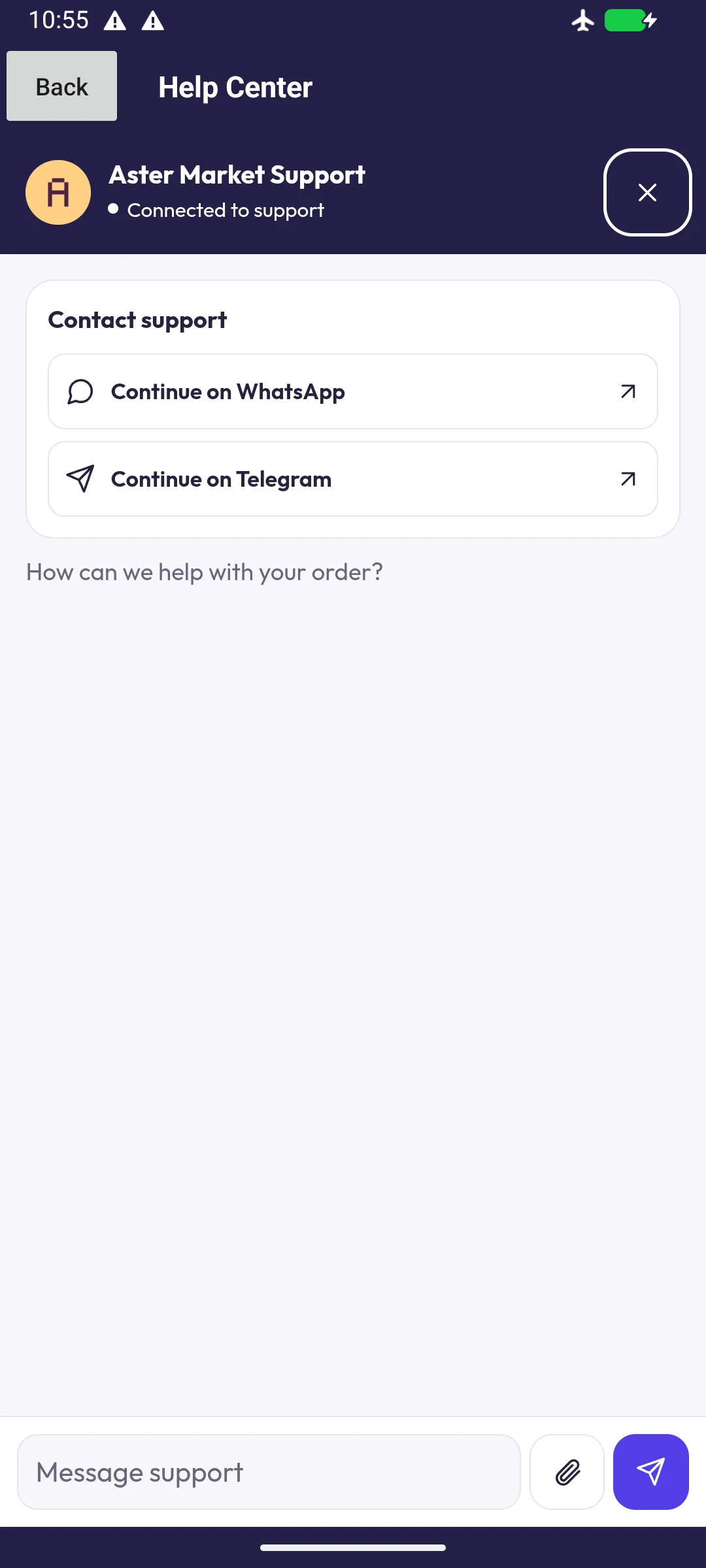
Open WhatsApp and Telegram links safely. The chat opens these links as new windows. Intercept user-initiated new-window requests (WKUIDelegate createWebViewWith on iOS, WebChromeClient.onCreateWindow with a child WebViewClient on Android), keep the Help Center WebView and its ticket in place, and hand the URL to the operating system only if it passes this check:
function canHandOffSupportLink(href) {
  try {
    const url = new URL(href);
    return url.protocol === 'https:' &&
      ['wa.me', 't.me'].includes(url.hostname) &&
      !url.username && !url.password && !url.port;
  } catch {
    return false;
  }
}
On iOS, call UIApplication.shared.open(url) after the check and return no child WebView. On Android, launch an ACTION_VIEW intent. Decline every other destination.
This flow has been exercised in a WKWebView on an iOS simulator and in Android System WebView on an emulator, including Back navigation, the on-screen keyboard, an agent reply, a callback request, channel link interception, and refusal on a non-allowlisted origin. Test it in your own shipping app on the physical devices you support, including file handling, external links and signed-in continuity.
Option B: React Native customer SDKLink to this section
The optional @kasadesk/react-native-chat package renders a full-screen native chat. Mount it on your Support route:
<KasaDeskChatScreen
  baseUrl="https://support.example.com"
  siteKey="pk_EXAMPLE_PUBLIC_SITE_KEY"
  getIdentityToken={getIdentityTokenFromYourServer}
  storage={secureStoreAdapter}
  onClose={() => navigation.goBack()}
/>- Omit
appOriginto use native-app mode. The channel’s Native app access must then beenabledorverified_only. verified_onlyrequiresgetIdentityToken, which must fetch a token signed by your backend. Use it for Support screens behind sign-in.storagepersists the session, for example withexpo-secure-store. Use a separate storage namespace per signed-in user, because the screen has no sign-out call.colorScheme="light"or"dark"overrides the brand’s chat mode for native surfaces.
| Native app access | Session requests without a browser origin |
|---|---|
disabled (default) |
Refused. |
enabled |
Guests and verified customers may start sessions. |
verified_only |
A valid identity token is required. |
The site key is publishable, so enabled does not authenticate your app. Changing the mode does not end sessions that already exist, which last up to seven days.
Current SDK limits: updates arrive by polling every few seconds, customers cannot upload attachments, and there is no greeting or typing indicator. The SDK has been run on an iOS simulator. Test Android, physical devices and release builds of your own app.
Customer records for verified customersLink to this section
Agents can see a verified customer’s account status and recent orders in the inbox when you connect a read-only records endpoint. Open Admin → Settings → Developer → Customer records.
- Choose the Chat site (the Web Chat channel whose signed identities you use).
- Enter the HTTPS endpoint and a dedicated read-only bearer key. Save connection, then Test endpoint. KasaDESK sends
{"mode":"test"}and expects{"ok":true}. - Tick Enable customer records and save again. Allow AI to use these records is a separate opt-in.
For lookups KasaDESK sends {"mode":"lookup","subject":"customer-42"} with the subject from the signed identity. Return the same subject, an optional accountStatus (active, pending, suspended or closed) and up to five orders with reference, status, and optional placedOn and estimatedDeliveryOn dates. Return orders: [] for unknown customers. Responses are limited to 32 KiB and four seconds.
For WooCommerce, the WordPress plugin provides this endpoint. In Settings → KasaDESK → Customer context (WooCommerce), copy the Endpoint URL, choose Generate API key (shown once), and enter both in KasaDESK. It reads orders without WooCommerce REST credentials and never writes to the store. It requires HTTPS, a non-plain permalink structure and Identify logged-in users.
Records are shown only for conversations with a signed identity. A typed email or order number never unlocks them.
Server integrationsLink to this section
For the complete API, scoped keys, outgoing webhook signatures and customer records contract, see Developer API and webhooks.